
Wallets
Trade with the wallet built into Corium, or with any Solana wallet you already use. Either way the keys are yours: Corium never holds them, and nothing moves without your say.
Cori's wallet
Cori's wallet is built into Corium: no extension to install, no app to switch to. It's first in Connect a wallet.
- Make one in a tap. The keys are made on your device and locked with your passkey: Face ID, Touch ID, your fingerprint or Windows Hello.
- Write down your recovery phrase. Twelve words, shown once. Type three of them back to prove you have them. Until you do, Corium reminds you on every page.
- Fill it. Deposit SOL from another wallet or an exchange to its address, and trade.
Already have a phrase? I have a recovery phrase brings that wallet in.
Who holds what
| Your keys | Made and kept on your device, in a separate, locked-down part of Corium (wallet.corium.so) that the rest of the site can't read. Corium's servers never see them, your passkey's secret or your phrase. |
| The backup | When you're signed in, your wallet is also backed up to your Corium account, sealed with your passkey. Sign in on another device and your passkey brings the wallet there. Corium can't open the backup. |
| Your recovery phrase | The only sure way back if you lose this browser or phone and your passkey. Keep it on paper, private. Nobody at Corium will ever ask for it. |
In the Android and iOS apps, Cori's wallet works the same way, and its keys never leave your phone.
Instant limits
Small trades sign the moment you press Buy, with nothing to approve. By default:
| Per trade | Up to 1 SOL |
| Per day | Up to 5 SOL |
Change them in your wallet (up to 10 SOL a trade and 50 SOL a day). Lowering them is instant; raising them asks for your passkey. Anything over your limits, every withdrawal, and any other message or transaction asks for your passkey first, and shows what it does.
Two taps
Because Cori's wallet signs inside Corium, with no wallet app in between to ask you, a buy button takes two taps: the first arms it (a check, or "Tap again to confirm" on a big one), and a second within 3 seconds goes. With any other wallet, which asks for itself, one tap is enough.
The wallet panel
Wallet in the top bar (in the You menu on a phone) opens it: what it holds, in dollars or SOL; Deposit with your address and a QR code; Withdraw SOL or any token to another address; your instant limits; and your recovery phrase.
Your own wallet
Any Solana wallet that supports the Wallet Standard works: Phantom, Solflare, Backpack and the rest. In the Android app, your wallet app connects through Mobile Wallet Adapter (Seed Vault on a Seeker, Phantom, Solflare). Every trade opens in your wallet for you to check and approve.
You can link several wallets to one account. Linked wallets →
The quick sheet and the You menu
On a phone, Corium's bar along the bottom is Home · Trade · ⚡ · Earn · You.
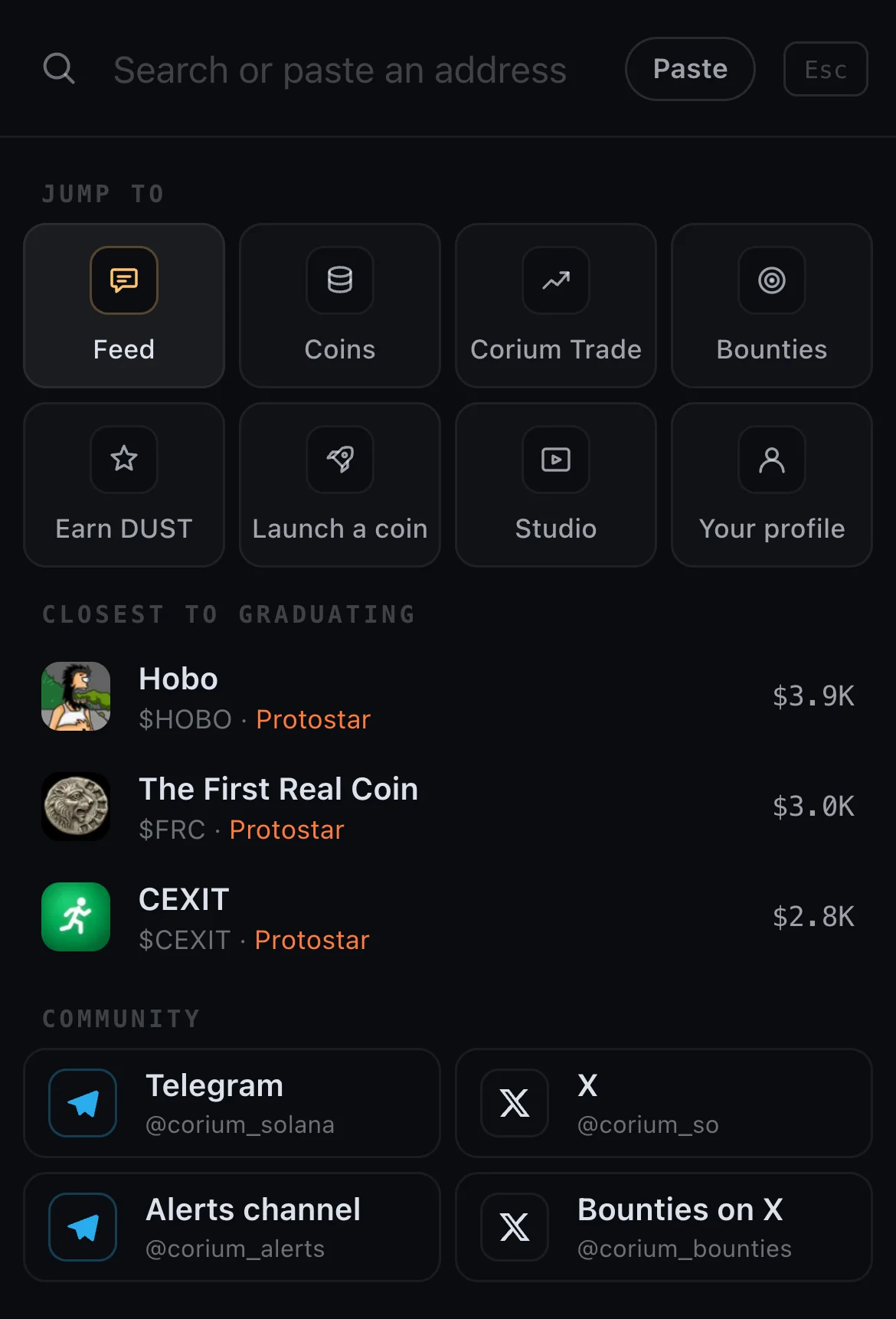
⚡ opens search and quick actions in one sheet:
- Your positions first: what your account's wallets hold, with each one's value and how it's doing against what you paid, and Sell, which opens the coin's trade panel on Sell. Nothing is sent without your wallet.
- Type to find pages, Corium's coins, any Solana token, people and posts; your own coins that match come first. Paste an address: a Corium coin opens at once, anything else is searched.
- Ask a question ("how do bounties work?") and Cori answers.
- Quick actions: Post, Launch, Bounty, Trade, Invite.
On a computer the same search is the field in the top bar, or / or Ctrl/Cmd+K anywhere.
You wears your picture and opens everything else: your profile, messages, your wallet, search, every part of Corium, and Corium's channels on Telegram and X.
Keep your phrase safe
Corium will never ask for your recovery phrase or private key, in a post, a DM or anywhere else. Anyone who does is a scammer. Safety →
Next: The apps →