Trading
Trade from wherever you are on Corium: from a post on the Feed, from a coin's page, or from Corium Trade, which reaches every Solana token. Corium's own coins trade on their bonding curve; everything else goes through Jupiter's best route.
From the Feed
Every coin on the Feed has Ape in: a small buy sheet with the coin's price, your preset amounts and any amount you type. A Corium coin on its curve is bought there; anything else through Corium Trade. When it lands, Corium offers to post it, and a post made then is a call scored from that price. Buying from a post →
Your first trade on Corium, of any size and anywhere, is one of the three steps that open posting.
On the bonding curve
Until it graduates, every coin trades against its own bonding curve (Meteora DBC). There is no order book and no counterparty: you buy from the curve and sell back into it.
- Buying puts SOL into the curve and pushes the price up.
- Selling takes SOL out and pushes it down.
- The market cap shown is price × total supply, in dollars at the live SOL price.
- The curve bar shows how much SOL is in the curve out of the 85 SOL it takes to graduate.
Every trade pays a 1% fee (50% in the first 60 seconds after launch, decaying to 1%). Where it goes →
The trade panel
| Buy | Enter SOL, or pick 0.1, 0.5, 1 or 5 SOL |
| Sell | Enter tokens, or pick 25%, 50%, 75% or Max of your bag |
| You receive | The quote, after fees and price impact |
| Price impact | How far your own trade moves the price |
| Slippage | 1%, 5% or 10%. If the price moves more than this before your trade lands, it fails instead of filling at a worse price. |
Selling Max sells your exact balance, so nothing is left behind as dust.
The chart and terminal mode
Every coin on Corium (its own coins, pump.fun coins and any token in Corium Trade) has the same chart, Corium Charts:
- Market cap or price, in USD or SOL, on a linear, log or % scale. Candles from 1 second to 4 hours on Corium's own coins, and to 1 week for pump.fun coins and in Corium Trade.
- Chart types: candles, hollow candles, Heikin Ashi, bars, line or area.
- Indicators (the ƒx button): volume, moving averages (simple, exponential, weighted), VWAP, Bollinger Bands, Donchian Channels, Supertrend, Parabolic SAR, RSI, MACD, Stochastic, Stochastic RSI, ATR, OBV, MFI, CCI, Williams %R and the volume profile of what is on screen. Add as many as you like; each has its own settings and colour, hides or comes off from its line in the legend, and oscillators get a pane of their own.
- Drawing tools (the rail on the left; on a phone, the ✎ button): trend line, ray, extended line, arrow, horizontal line and ray, vertical line, parallel channel, rectangle, Fibonacci retracement, long and short positions (target, stop and risk:reward), measure, text and a brush. Click to place the points, or drag. Click a drawing to select it: drag it or its handles, change its colour, width and style, lock, clone or delete it. The magnet snaps points to the candles' open, high, low or close. Drawings are kept per coin in your browser and show on every page that charts that coin.
- Price alerts (the bell, Alt+A, or right-click a price): an alert rings once when the price crosses it, while Corium is open in a tab.
- Shortcuts: Alt+T trend line, Alt+H horizontal line, Alt+J horizontal ray, Alt+V vertical line, Alt+R rectangle, Alt+F Fibonacci, Alt+L long position, Alt+M measure, Shift+click a quick measure, Ctrl/Cmd+Z undo, Ctrl/Cmd+Shift+Z redo, Delete removes the selected drawing, Esc cancels.
- Arrows mark the dev's trades and yours, dashed lines the final stretch and supernova levels, and your average entry in Corium Trade. A countdown under the price shows when the candle closes. The camera button saves a picture of the chart to share; the ⛶ button makes it full screen.
The chart is drawn with TradingView's open-source Lightweight Charts engine; the tools on it are Corium's.
Terminal mode (the layout button beside full screen, or F) turns a coin's page into a full-screen trading terminal: a big chart, the star small beside the trade panel, trades (and the chat, on Corium's coins) underneath, and a strip of coins across the top (your watchlists, what you opened lately, then the hottest), Corium's coins and Corium Trade's tokens side by side. Switch coins with [ and ], search any token with /, leave with Esc. Every coin page has it: a Corium coin's, a pump.fun coin's and a token's in Corium Trade, laid out the same way, and it stays on, across all of them, until you turn it off. Corium Trade opens in it the first time. It needs a screen at least 1000 pixels wide; on a phone, a coin's page shows one section at a time and the trade panel slides up from Buy and Sell.
Corium Trade: any Solana token
Corium Trade is the Feed's Trade tab (and corium.so/trade). It trades any Solana token with a market: pump.fun, Bonk, Bags, Believe, Meteora, Raydium, Orca, Moonshot and the rest, each on Jupiter's best route, and pump.fun coins still on their curve directly on pump.fun.
- Fee: 0.25% a trade, nothing else on top from Corium. It is a plain SOL transfer to Corium's treasury inside the same transaction, so anyone can see it. A buy of 1 SOL spends 1 SOL in all; a sale's fee comes out of the SOL it returns. The network's priority fee is separate and set by the speed (fast, turbo, ultra) in the trade settings.
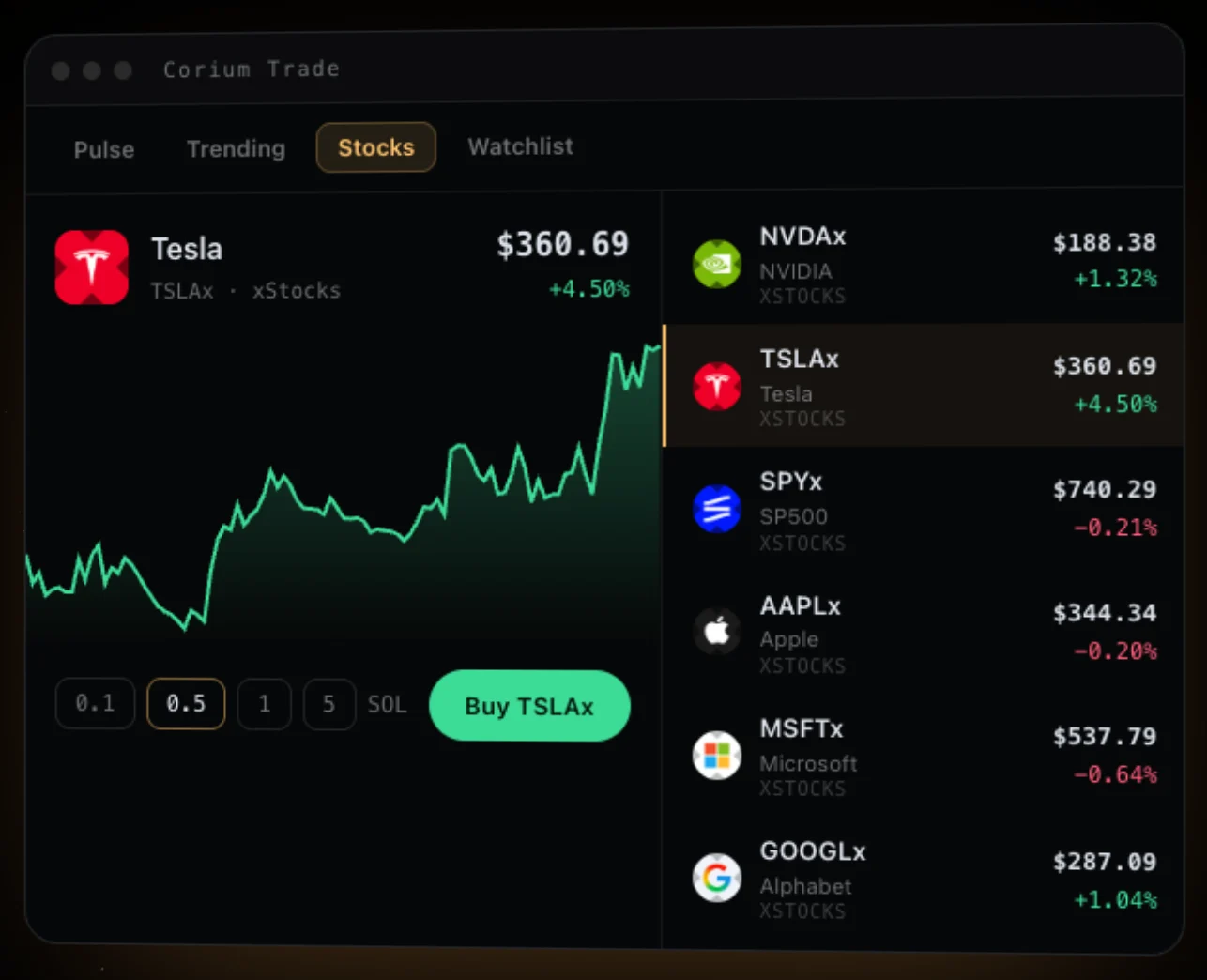
- Pulse lists new coins, coins in their final stretch and coins that just graduated, across launchpads (pick the launchpads you want); Trending ranks by trending, volume or organic activity over 5 minutes to 24 hours, or lists the big coins (worth $50M or more); the watchlist keeps your stars. Search by name, ticker, or paste any mint; Corium's own coins come first and open on their Corium pages.
- Stocks lists tokenized stocks: tokens that track a company's shares (xStocks, Backpack, Ondo) or a private company's before it lists (Pre-IPO), such as Nvidia, Tesla, the S&P 500, OpenAI and Anthropic. They trade around the clock like any token, at the same 0.25%. Each tracks its shares as its issuer says; read the issuer's terms before you buy, as you would a fund's.
- A token's page is laid out like every coin page on Corium: the chart, its trades (filter big ones, the dev's, yours), holders, your trades, and beside them the trade panel, the safety screen, the audit and the token's facts. The trade panel has your preset amounts (one tap trades when a wallet is connected), a live quote with price impact, the fee and the route, slippage and speed, and your position with its profit and average entry. B and S switch buy and sell.
- In the apps, Trade has its own tab at the foot of the screen, with the same Pulse, Trending, Stocks, watchlist and search, a one-tap buy on every row (the amount is in the trade settings), and every token's page with its chart, screen, audit, your position and a live quote before you sign.
- One-tap trades are on by default in the trade settings: a preset amount buys as you tap it. With Cori's wallet, which signs inside Corium, the first tap arms the button and a second within 3 seconds buys.
- Trades in Corium Trade earn trading DUST and SPARK, and count for the trade quests. A buy of a pump.fun coin in its final stretch counts as a stretch attempt, the same as one made on its Corium page.
Trading from Telegram
The Corium bot puts Buy and Sell buttons on its alerts, and /buy HDOG 0.5 or /sell HDOG 50 makes one for any coin. A button opens the coin in Phantom or Solflare with the trade already filled in; you check it and approve it in your wallet. The bot never trades by itself and never has your keys.
Near the top of the curve
A buy bigger than the room left before 85 SOL is filled partially: you get tokens up to the graduation price, and the rest of your SOL stays in your wallet. The trade panel tells you in advance when this will happen and how much comes back.
Graduation
When the curve reaches 85 SOL, the coin graduates:
- Its star goes supernova, live on every screen that shows it.
- Its liquidity (the SOL in the curve and 20% of the supply) moves into a Meteora DAMM v2 pool, locked forever: nobody can pull it.
- The final-stretch buyers who hold through the next 10 minutes split the supernova bounty.
Migration usually lands within moments of graduation. While it runs, the coin page shows Moving to Meteora.
After graduation
You keep trading the coin on Corium, now against its DAMM v2 pool. The trade panel says which venue you are on. The pool's fee starts at 1% and steps down to 0.25% as the coin grows, so it's never above pump.fun's at the same market cap (the steps). After Meteora's protocol share, a fifth of it stays in the pool, deepening its liquidity; the liquidity belongs 75% to the creator and 25% to Corium, and neither can ever withdraw it.
Your positions
Your profile shows what your wallets hold now, read from the chain, with value and profit against your average cost; your bounties (pending in a final stretch, or ready to claim); the coins you launched; and your trade history. On a phone, ⚡ opens with your positions first, each with Sell. The quick sheet →
Know what you're buying
Anyone can launch a coin. A coin on Corium is not endorsed by Corium, and most memecoins go to zero. Check the creator's trades, the holder list and the socials before you buy.
Next: Stars →